Introduction
Return to Home (RTH) is a useful safety feature in modern drones. It helps a drone return to its recorded home point when the pilot activates it, the battery becomes low or the controller loses connection.
However, RTH does not guarantee a safe return every time. Incorrect settings, weak GPS signals, obstacles and low battery levels can cause problems. Understanding how this feature works is important before flying.
1. Check the Home Point Before Take-off
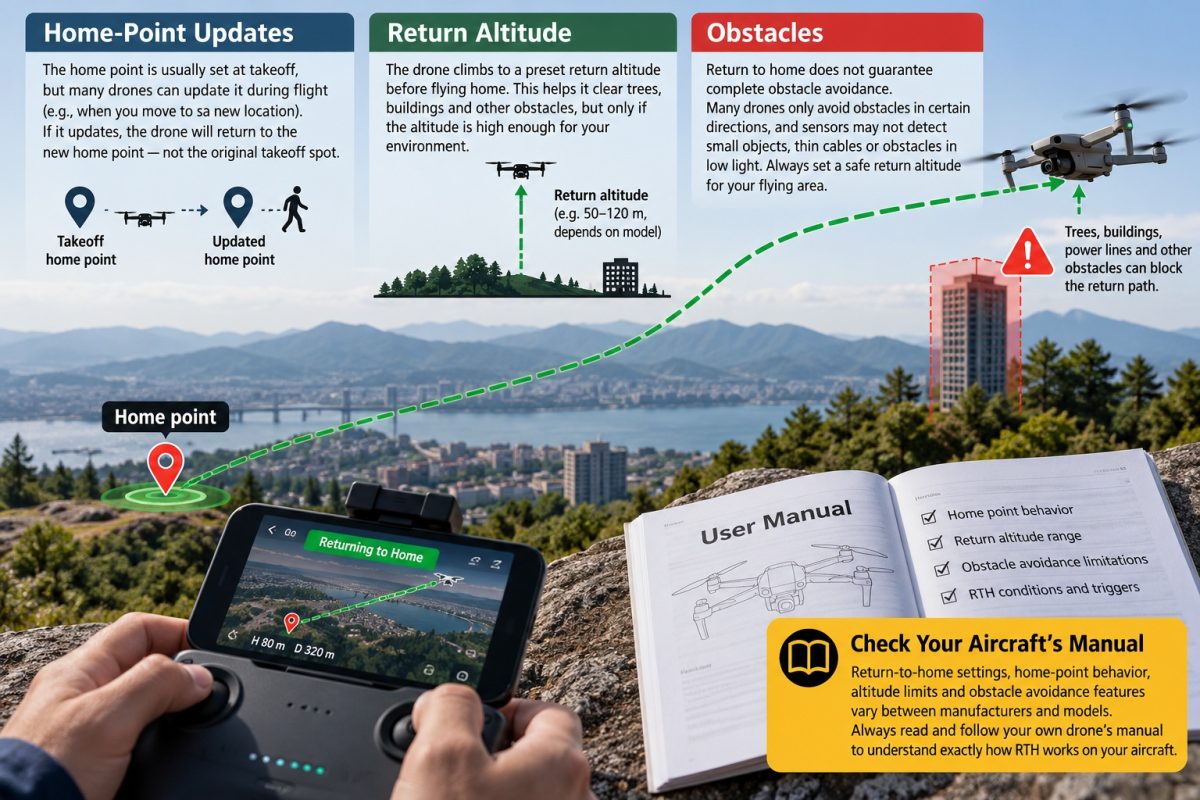
The home point is the location where the drone is programmed to return. Most GPS-enabled drones record this location after receiving a reliable satellite signal.
Before take-off, wait for the home point confirmation and check its location on the map.
Remember that the home point does not automatically follow the pilot. If you walk away from the take-off location, the drone may still return to its original coordinates.
This can be especially risky when flying from a moving boat. Some drones allow home point updates, so check your model's manual.
2. Set the Correct RTH Altitude
RTH altitude determines how high the drone may climb during its return, depending on the model and return mode.
If the altitude is too low, the drone may hit trees, buildings or other obstacles. Setting it unnecessarily high can waste battery and may create airspace problems.
For example, if nearby trees are 18 metres tall, an RTH altitude of 15 metres may not provide enough clearance.
Always check the surrounding obstacles, terrain and legal height limits before choosing an appropriate return altitude.
3. Understand Signal-Loss Settings
Many drones offer three possible actions when the controller connection is lost:
-
Return to Home: The drone attempts to return to its recorded home point.
-
Hover: The drone stays in its current position, if positioning is available.
-
Land: The drone attempts to land near its current location.
Each option has advantages and risks. Hovering may be unsuitable over water, while automatic landing may be dangerous over roads or crowded areas.
Choose the setting based on your flying location and confirm it before take-off.
4. Obstacle Sensors Have Limitations
Some drones use cameras and sensors to detect obstacles during RTH. However, these systems cannot identify every object.
Thin wires, tree branches, glass surfaces and obstacles outside the sensor's viewing area may not be detected.
For example, if a drone loses connection behind a row of trees, it may begin returning through an unsafe path.
Do not depend completely on obstacle avoidance. Plan a clear return route and understand your drone's sensor limitations.
5. Do Not Ignore Battery Warnings
Low Battery RTH helps the drone return when its remaining battery level becomes insufficient for continued flying.
However, battery consumption depends on wind, distance, temperature, altitude and battery condition.
Strong headwinds can increase power consumption during the return journey.
Always begin returning with enough battery remaining. Do not wait for the automatic warning.
If the drone reports critically low battery power, find a safe landing location instead of forcing it to reach the home point.
6. Check GPS and Compass Conditions
RTH depends on accurate positioning and navigation information.
Weak GPS signals, compass errors and electromagnetic interference can affect the drone's ability to return correctly.
Metal structures, vehicles and reinforced concrete may interfere with navigation systems.
If the app displays a compass or positioning warning, do not ignore it. Move to a suitable open location and follow the manufacturer's troubleshooting instructions.
Avoid unnecessary compass calibration unless recommended by the manual or app.
7. Follow Drone Airspace Rules in India
RTH does not give permission to fly in restricted airspace.
Under India's Drone Rules, 2021, pilots must check the Digital Sky airspace map before flying.
Indian airspace includes green, yellow and red zones. Yellow and red zones require the applicable permissions, while green-zone operations must also follow the relevant rules.
Check for temporary restrictions and ensure the RTH altitude stays within permitted limits.
8. Quick RTH Safety Checklist
Before every flight:
-
Confirm the home point is recorded correctly.
-
Set a suitable RTH altitude.
-
Check the selected signal-loss action.
-
Understand obstacle sensor limitations.
-
Check battery health and wind conditions.
-
Verify GPS and compass status.
-
Check the Digital Sky airspace map.
-
Maintain visual contact with the drone whenever required.
Conclusion
Return to Home is a helpful drone safety feature, but it should not replace careful flight planning. A correct home point, suitable altitude, reliable positioning and sufficient battery power are essential for a safer return.
Always review your RTH settings before take-off and follow the instructions in your drone's manual. A few simple checks can help prevent avoidable accidents.