Why does a drone wander indoors?
A drone that holds its position outdoors may drift, slide or slowly wander inside a building. One common reason is that satellite positioning becomes weak or unavailable indoors. When that happens, some drones use downward-facing vision sensors to estimate movement by observing the surface below them. If the floor is plain, shiny, dark or poorly lit, the aircraft may have less visual information to work with. The exact behaviour depends on the drone model and its sensors. DJI also warns that weak indoor GPS can cause an aircraft to drift, so pilots should not assume that indoor hovering will be as steady as outdoor hovering. [3]
What the small camera underneath actually does
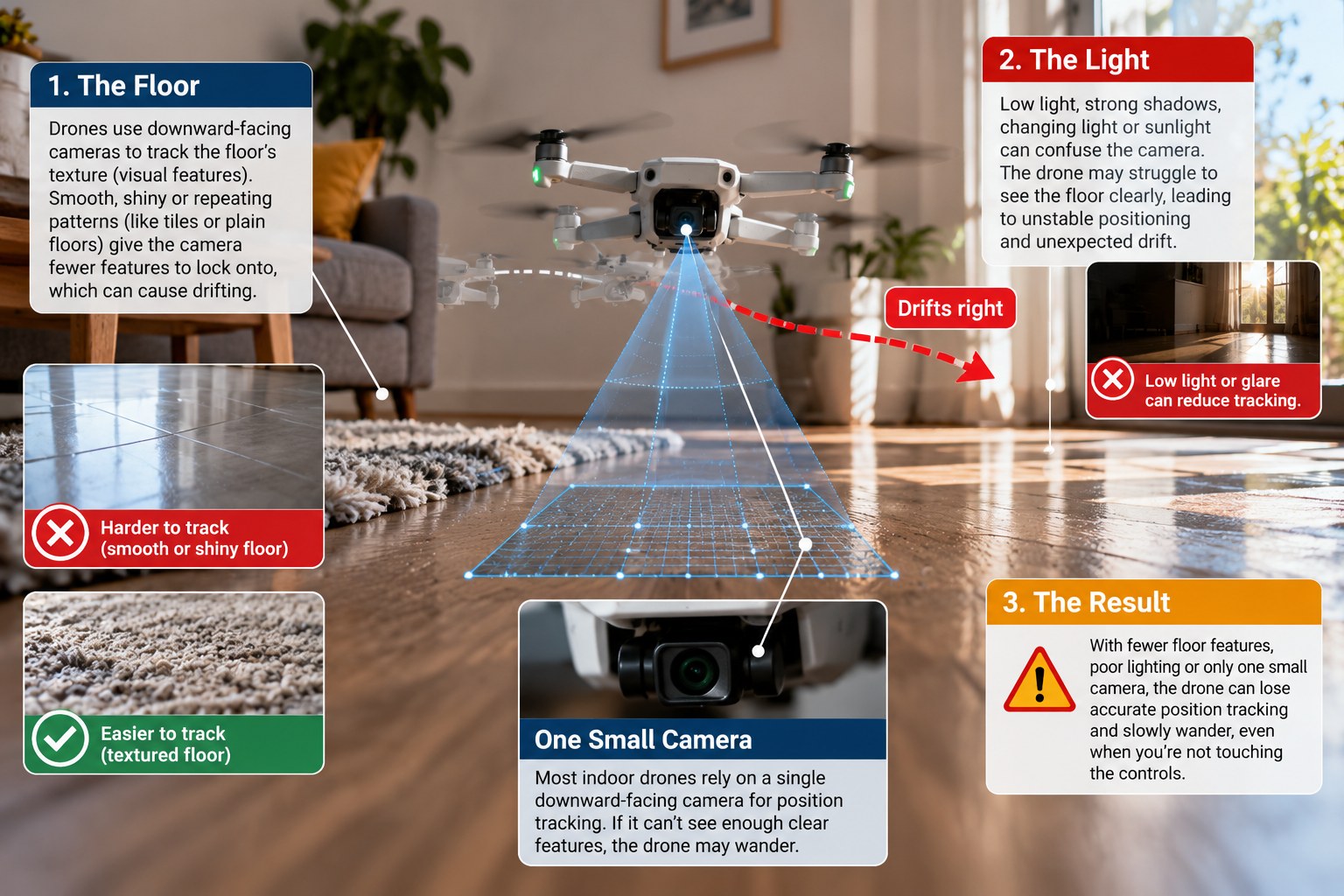
Many camera drones have a downward vision system. It looks at the ground and uses changes in the visual pattern to help estimate whether the aircraft is moving. The flight controller can then use that information, along with data from other sensors, to make position corrections. This is often described as visual positioning. The hardware differs between models: some aircraft use one or more cameras, while others combine cameras with infrared or other sensors. Check the manual for your exact drone rather than assuming every model uses the same setup. [2]
Think of it like trying to judge your movement while looking at the floor of a moving walkway. A floor with visible marks makes movement easier to notice. A plain, reflective or very dark floor gives the system less useful detail.
Three common reasons for indoor drift
1. The floor has too little visual detail
A plain white floor, a uniformly dark mat or a surface with very repetitive patterns may give a vision system fewer distinctive features to track. Highly reflective surfaces can also make visual sensing harder. DJI says its vision-sensing capability depends partly on the reflective properties of the surface and can decrease over smooth surfaces such as mirrors or tiles. This is manufacturer guidance about DJI systems; it should not be treated as a universal performance measurement for every drone brand. [1]
Practical example: a pilot takes off over polished marble. The drone begins to slide slightly even though the room appears bright. The floor may be reflecting light and offering too little useful texture for the downward system.
2. The room is too dark or the lighting changes suddenly
Vision systems need enough light to recognise surface detail. A dim room, strong shadows or a sudden change from a bright doorway to a dark room can reduce the information available to the sensors. DJI’s Mini 4 Pro manual says its vision systems work best with adequate lighting and warns that low-light conditions can reduce positioning performance, even when the auxiliary light is on. The exact light requirements vary by model. [2]
Practical example: a drone is stable near a sunlit window but begins drifting after it moves into a darker corner. Land it and improve the lighting rather than trying to correct the drift close to furniture.
3. The downward sensor is dirty, covered or reporting a fault
Dust, fingerprints, protective film or an incorrectly fitted accessory can interfere with a sensor. Before flying, inspect the sensor windows and check that nothing is blocking them. DJI’s troubleshooting guidance recommends checking for protective film and cleaning dirty vision-system lenses carefully; follow the cleaning method in your own aircraft’s manual. If the app displays a vision-system or calibration warning, follow the on-screen instructions and do not ignore a persistent warning. [4]
Do not touch or scrape the sensor surface with a rough cloth. If the sensor looks damaged or the warning remains after the recommended checks, stop flying and contact the manufacturer or an authorised service provider.
Why GPS may not hold the drone steady indoors
GPS/GNSS signals are often weakened or blocked by roofs and walls. DJI notes that indoor GPS can be obstructed and that an aircraft may drift as a result. Some models can use a downward vision system when GNSS is weak, but that system also has operating limits. If both satellite positioning and visual positioning are unreliable, the aircraft may be more affected by air movement and may not hold its position automatically. [2][3]
This is why a drone that behaves well in an open field may behave differently in a living room, warehouse or covered courtyard. It is not automatically a hardware fault, but repeated or unexpected drift should always be treated as a safety issue.
A safe indoor test routine
Choose a wide, open area with no people, pets, ceiling fans, loose objects or hanging cables.
Use bright, even lighting and avoid strong glare or deep shadows.
Prefer a matte surface with visible texture. Avoid testing over glossy, reflective or featureless flooring.
Check that the downward sensor windows are clean and unobstructed.
Read your drone’s manual to confirm when its vision-positioning system is active and what conditions it requires.
Start with a low, brief hover and make only small control inputs. Keep the aircraft in sight and be ready to land.
If it drifts unexpectedly, land in a safe place. Do not keep testing near people, windows or valuable objects.
A realistic example: a living-room hover test
Imagine a pilot testing a compact camera drone in a living room with polished white marble flooring. The room has soft lighting and little furniture detail. The drone lifts off and slowly moves sideways. The pilot tries to correct it, but the aircraft continues to wander. A safer response is to land, check the sensor windows, improve the lighting and move the test to a clear area with a matte, textured floor. If the drone still drifts, the pilot should stop the test and check the app warnings and model-specific troubleshooting instructions.
The important point is not that every marble floor will cause drift. It is that floor texture, reflectivity, lighting and sensor condition can affect visual positioning, and the pilot must check the operating limits for the specific aircraft. [1][2][4]
Do not mistake indoor hovering for risk-free flying
Indoor flight can be hazardous even with a small drone. A short drift can send propellers into a person, pet, television, window or ceiling fixture. Obstacle sensors may not cover every direction, and positioning assistance is not a substitute for active control. Keep the test area clear, maintain visual attention and land if the aircraft behaves unpredictably. DJI’s manuals also remind pilots that vision systems work only in certain conditions and cannot replace human judgement. [2]
The takeaway
If your drone wanders indoors, check three things first: the floor, the light and the downward-facing sensors. A surface with visible texture, bright and even lighting, and clean, unobstructed sensors can help a supported vision-positioning system work as intended. But performance differs by model. Check the aircraft manual, keep the test area clear and land if the drone does not hold position safely.