Rolling Shutter Distortion in Drones
Have you ever watched drone footage and noticed a lamp post that looks bent, even though it’s totally straight in real life? Sometimes cars look stretched, or buildings seem a little tilted. This is called rolling-shutter distortion, and it happens because the camera sensor doesn’t capture the whole picture at the same moment.
How does it happen?
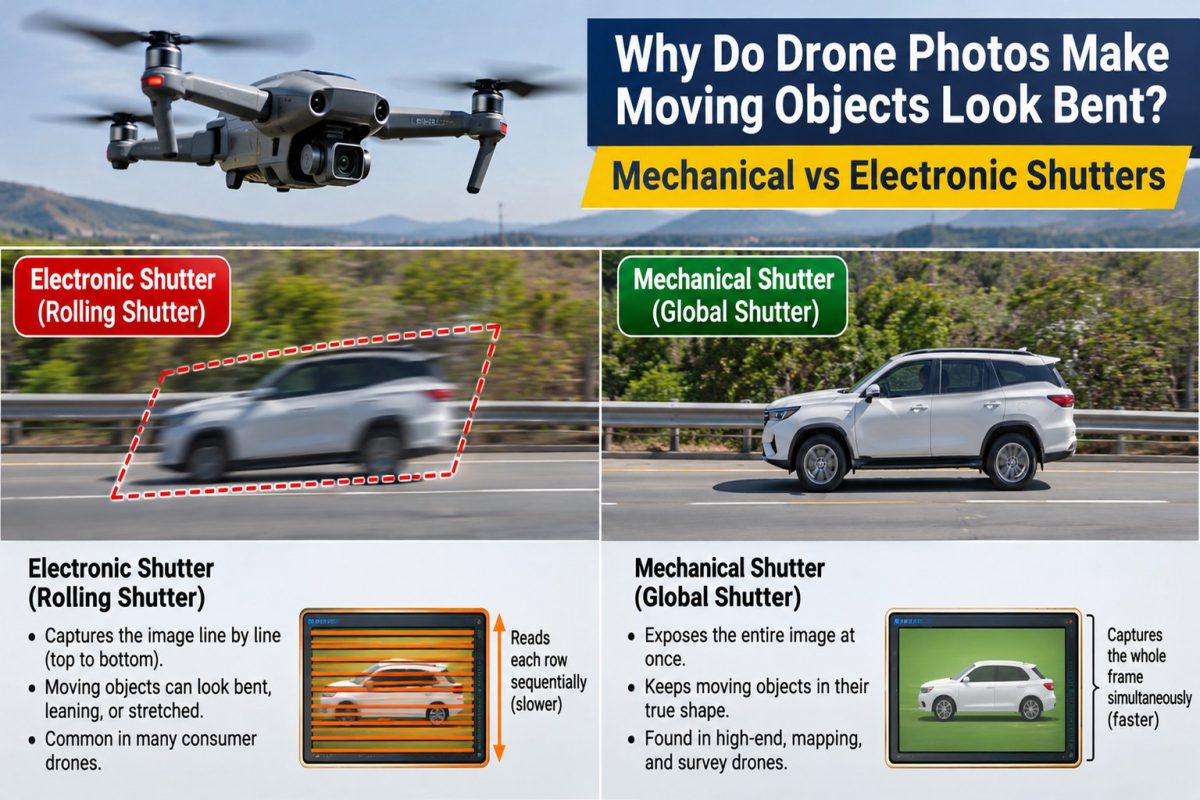
Most drone cameras use CMOS sensors, which have millions of tiny pixels that sense light. In a rolling-shutter camera, the sensor records the image one row at a time instead of all at once. Since each row is captured at a slightly different time, anything moving while the picture is being taken can look wrong. If the drone moves sideways or turns, a straight lamp post can end up looking slanted. This is also why propellers sometimes look curved in drone videos.
Why readout speed matters
How fast the sensor reads the full image makes a big difference. Say a drone is moving sideways at 5 metres per second and the camera takes 20 milliseconds to read one frame. In that time the drone moves about 10 centimetres, so different parts of the image get shifted a little. A higher frame rate doesn’t always mean faster readout either, so it’s smart to check the camera specs before buying a drone for serious work.
Types of shutters
There are three main types.
Mechanical shutter: It uses real moving parts to control exposure and keeps the timing difference small. Some mapping drones use it because the photos come out more consistent.
Rolling electronic shutter: It captures images electronically, usually row by row. It’s small and cheap, so you find it in many compact drones, but fast movement can bend or tilt objects.
Global electronic shutter: It captures all pixels at almost the same time, so there’s much less bending. It’s great for fast movement and surveying, but it costs more and has some technical trade-offs.
Effect on drone mapping
Mapping software uses overlapping photos to find common points and build orthomosaics and 3D models. If the photos have rolling-shutter distortion, the same object can look slightly different in each picture, and the software has trouble matching them. For example, in a road survey a moving car might look stretched, and road markings might look uneven. Good overlap, calibration and steady flying help, but they can’t always fix distortion that’s already in the photos.
How to reduce it
- Avoid sudden turns and unnecessary sideways movement.
- Keep a steady speed and camera position.
- Check the propellers and mounts so there’s less vibration.
- Use a suitable shutter speed.
- Follow the recommended flight speed and overlap for mapping.
- Look through your photos for bent lines or stretched objects.
Also, don’t pick a drone only by its megapixels. Sensor size, lens quality and shutter type matter too.
Motion blur is different
A lot of people mix up motion blur and rolling-shutter distortion, but they aren’t the same thing. Motion blur happens when the camera or subject moves while light is being collected. Rolling-shutter distortion happens because the sensor rows are recorded at different times. A faster shutter speed reduces motion blur but doesn’t completely fix rolling shutter. A global or mechanical shutter works better for that.
Conclusion
Rolling-shutter distortion can make straight objects look bent or tilted in drone photos. It mostly comes from the time gap between recording different rows of the image. It might not matter much in casual videos, but it can cause problems in mapping, surveying and inspection. Choosing the right shutter, flying steadily and checking your images can help a lot. If you’re doing professional drone work, always look at the camera specifications first.