Setting Up Fixed Camera Points
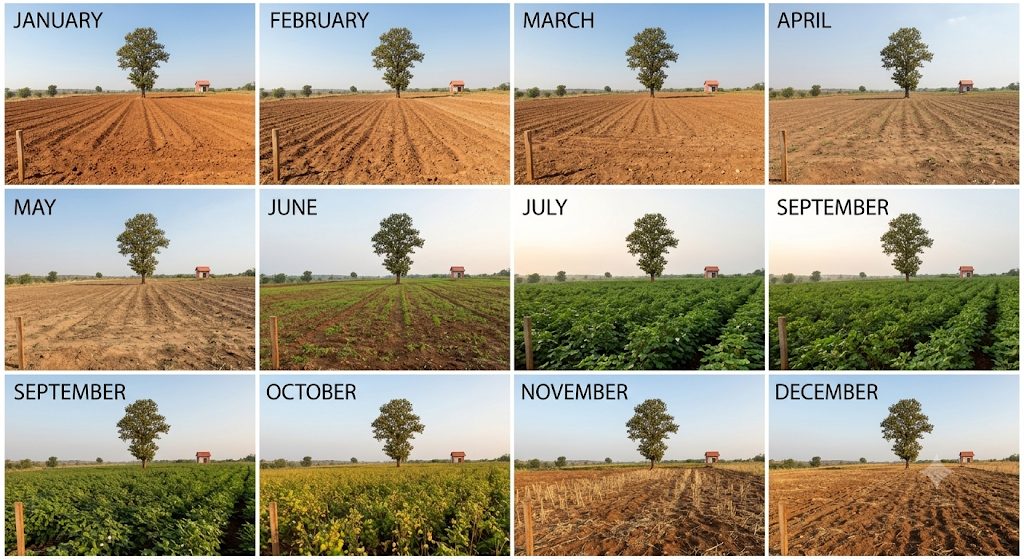
Taking regular pictures of your fields gives you a super helpful visual diary of crop growth, soil conditions, and seasonal changes across your land. However, according to established agricultural extension guidelines, if you photograph your farm from different spots, angles, or heights every month, it becomes really hard to spot actual crop progress over time (Penn State Extension).
To get clean, readable comparisons, drive a sturdy wooden post or metal stake into the ground at your main observation spots. Pick spots that show important areas of your farm, like hilltops that give wide field views, gate entrances, and low spots where rainwater usually piles up after a storm.
Keeping Framing and Timing Consistent
Tiny changes in how you tilt your camera or where the sun is sitting can change how healthy your crops look on screen, making your monthly photos less useful for tracking real changes. Crop monitoring guides emphasize that consistent environmental conditions are key for visual consistency (FAO).
- Fix your camera height: Place your phone or camera on a sturdy tripod set at eye level every single time you photograph your farm.
- Line up background markers: Match static background objects, like a distant fence post, barn roof line, or solitary tree, along the gridlines on your camera screen.
- Shoot at the same time of day: Take your pictures around the same hour—ideally early morning or late afternoon—so shadows and sunlight stay consistent across every photo set.
Tracking Visual Changes Over Time
A steady set of monthly field photos highlights broad visual patterns as your crops develop across the growing season. You can observe how quickly plant canopies close over bare soil, spot early signs of drought stress, monitor weed expansion, and track water drainage patterns following heavy rainfall (Penn State Extension).
These visual logs help you test whether changes to your field routines—like updating fertilizer timing, changing up crop rotations, or tweaking watering schedules—are actually showing real improvements compared to past seasons.
Understanding What Standard Photos Cannot Show
While monthly pictures work great as an early warning system, regular photos cannot replace real scientific soil testing or plant tissue analysis in a lab.
Standard digital camera sensors only capture visible RGB light spectrums. They cannot detect early nutrient shortages, soil pH problems, or root diseases hiding under the dirt before physical leaf damage actually shows up. Use your photo log to catch field variations early, then follow up with soil sampling or tissue testing to figure out exact causes.
Organizing and Storing Your Digital Records
Building a useful photo history only works if you keep your image files organized so you can look back at previous seasons without getting confused. Scattering photos across a messy phone gallery makes side-by-side field comparisons frustrating and slow.
Set up specific digital folders for each field and year on your computer or cloud storage drive. Label every photo file with the date, field location, and crop name. Writing down quick notes about recent weather events, rainfall amounts, or fertilizer treatments alongside your photos gives you a complete historical record that helps you make smarter planting choices for future seasons (FAO).