Check Local Rules and Protect Wildlife
Before you take out your camera or fly a drone along the shore, check the local coastal rules and airspace rules first. FAA recreational guidelines say that many popular beaches are inside restricted zones where you need permission to fly.
You also have to watch out for shorebirds and nesting sea turtles. Loud drone propellers or walking near the sand dunes can bother nesting animals and leave their eggs open to predators and extreme heat. Always stay a respectful distance from the dunes and wildlife areas so your photo session doesn’t hurt the environment.
Composition and Framing: The Scene
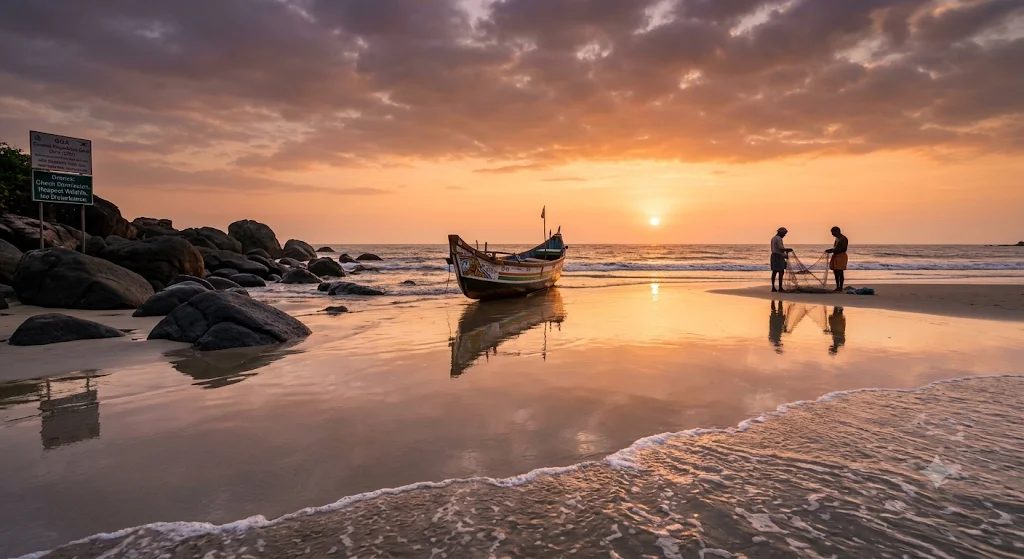
Picture a quiet beach in Goa right at sunset. There are dark boulders on the left, a bright, painted wooden fishing boat in the middle, and wet sand going out toward the waves. A really common beginner mistake is pointing the camera straight at the bright horizon. That leaves half the photo empty and boring. Instead, use the shoreline to lead the viewer’s eyes through the whole scene.
Composition and Framing: Three Tips
- Leading lines: Hold your camera low to the ground so the curved shoreline or lines of white foam point right at your main subject, like the fishing boat.
- Rule of thirds: Put the horizon along the top or bottom third of the frame instead of the middle. That gives either the sunset clouds or the wet sand more attention.
- Foreground anchors: Put wet rocks, seashells, or small tide pools near the bottom of the frame to make flat ocean views look deeper.
Exposure Settings: The Problem
Sunny beaches are hard to photograph. Strong sunlight bounces off the bright water, while the dark rocks and wooden boats sit in deep shadow. Automatic exposure often ruins the shot, because it turns the bright sky into a blank white sheet or makes boats look like dark silhouettes.
Exposure Settings: The Fix and the Trade-Off
Switch your camera to manual exposure. Set your ISO to 100 so the photo is clean with no grainy noise. Shoot during golden hour, when the light is soft and warm. Also shoot in uncompressed RAW. RAW keeps a lot of detail across the sensor, so you can bring back hidden shadow details on your computer later. The downside is that the files are huge, which slows down editing and takes up more storage space.
Controlling Glare and Reflections
Wet sand works like a giant mirror right after a wave goes back, showing the colorful sunset sky and nearby boats. But harsh midday glare off the water can wash out the colors and hide the interesting rocks underwater.
Screw a circular polarizing filter onto your lens to cut the glare and make blue skies darker. If you also want a slower shutter speed to blur the waves, put a neutral density filter on too. Angle your lens a little away from the sun, and press the shutter right when a thin, smooth layer of water settles on the flat sand, so you get a clear, glass-like reflection.